Bonjour,
Je génère un fichier en EML, mais le mail qui s'ouvre dans Outlook, ne donne pas la possibilité d'envoyer le mail.
Voici le code.
Code : Tout sélectionner
<textarea id="textbox" style="width: 300px; height: 200px;">:
<!-- From: [email protected] -->
To: [email protected]
<!-- AddCC:[email protected] -->
Subject: Demande création de ticket pour REGUL/COMPLEMENT.
Content-Type: multipart/mixed; boundary=--boundary_text_string
----boundary_text_string
Content-Type: text/html; charset=UTF-8

<html>
<head>
<body>
<table border="2" content="text/html; charset=UTF-8">
    <tr>
        <td bgcolor="blue" width="30%" ><FONT COLOR="white">Matricule Utilisateur :</FONT></td><td bgcolor="white"><?PHP print_r($_POST['username']);?></td>
    </tr>
    <tr>
<td bgcolor="blue" ><FONT COLOR="white">Type intervention (INCIDENT ou DEMANDE) :</font></td><td bgcolor="white"><?PHP print_r($_SESSION['TypeMail']);?></td>
    </tr>
    <tr>
<td bgcolor="blue" ><FONT COLOR="white">Groupe Assignation (assignement group) :</font></td><td bgcolor="white"><?PHP print_r($_POST['grpassign']);?></td>
    </tr>
    <tr>
<td bgcolor="blue" ><FONT COLOR="white">Affectation technicien (Assigned to) :</FONT></td><td bgcolor="white"><?PHP print_r($_POST['techname']);?></td>
    </tr>
    <tr>
<td bgcolor="blue" ><FONT COLOR="white">Arbre de Cloture (Work Notes) :</FONT></td><td bgcolor="white"><?PHP print_r($_SESSION['ValueGenerale']);?></td>
    </tr>
    <tr>
<td bgcolor="blue" ><FONT COLOR="white">Commentaire(s) (close notes) :</FONT></td><td bgcolor="white"><?PHP print_r($_SESSION['CommentTexte']);?></td>
    </tr>
</table>
</body>
</html>
</textarea>
</div>
<button id="create">
<a download="DemandeTicketRegul.eml" id="downloadlink">Télécharger le fichier pour l'envoyer.</a></button>

<!-- script de l'envoi par mail. -->
<script>
(function () {
var textFile = null,
  makeTextFile = function (text) {
    var data = new Blob([text], {type: 'text/plain'});

    if (textFile !== null) {
      window.URL.revokeObjectURL(textFile);
    }

    textFile = window.URL.createObjectURL(data);

    return textFile;
  };


  var create = document.getElementById('create'),
    textbox = document.getElementById('textbox');

  create.addEventListener('click', function () {
    var link = document.getElementById('downloadlink');
    link.href = makeTextFile(textbox.value);
    link.style.display = 'block';
  }, false);
})();
</script>
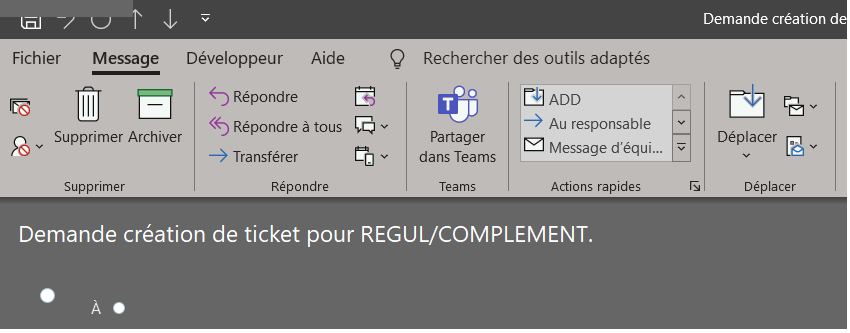
voici la capture du mail sans la possibilité d'envoi.
Merci
Bonjour,
Je génère un fichier en EML, mais le mail qui s'ouvre dans Outlook, ne donne pas la possibilité d'envoyer le mail.
Voici le code.
[code]
<textarea id="textbox" style="width: 300px; height: 200px;">:
<!-- From:
[email protected] -->
To:
[email protected]<!-- AddCC:
[email protected] -->
Subject: Demande création de ticket pour REGUL/COMPLEMENT.
Content-Type: multipart/mixed; boundary=--boundary_text_string
----boundary_text_string
Content-Type: text/html; charset=UTF-8
<html>
<head>
<body>
<table border="2" content="text/html; charset=UTF-8">
<tr>
<td bgcolor="blue" width="30%" ><FONT COLOR="white">Matricule Utilisateur :</FONT></td><td bgcolor="white"><?PHP print_r($_POST['username']);?></td>
</tr>
<tr>
<td bgcolor="blue" ><FONT COLOR="white">Type intervention (INCIDENT ou DEMANDE) :</font></td><td bgcolor="white"><?PHP print_r($_SESSION['TypeMail']);?></td>
</tr>
<tr>
<td bgcolor="blue" ><FONT COLOR="white">Groupe Assignation (assignement group) :</font></td><td bgcolor="white"><?PHP print_r($_POST['grpassign']);?></td>
</tr>
<tr>
<td bgcolor="blue" ><FONT COLOR="white">Affectation technicien (Assigned to) :</FONT></td><td bgcolor="white"><?PHP print_r($_POST['techname']);?></td>
</tr>
<tr>
<td bgcolor="blue" ><FONT COLOR="white">Arbre de Cloture (Work Notes) :</FONT></td><td bgcolor="white"><?PHP print_r($_SESSION['ValueGenerale']);?></td>
</tr>
<tr>
<td bgcolor="blue" ><FONT COLOR="white">Commentaire(s) (close notes) :</FONT></td><td bgcolor="white"><?PHP print_r($_SESSION['CommentTexte']);?></td>
</tr>
</table>
</body>
</html>
</textarea>
</div>
<button id="create">
<a download="DemandeTicketRegul.eml" id="downloadlink">Télécharger le fichier pour l'envoyer.</a></button>
<!-- script de l'envoi par mail. -->
<script>
(function () {
var textFile = null,
makeTextFile = function (text) {
var data = new Blob([text], {type: 'text/plain'});
if (textFile !== null) {
window.URL.revokeObjectURL(textFile);
}
textFile = window.URL.createObjectURL(data);
return textFile;
};
var create = document.getElementById('create'),
textbox = document.getElementById('textbox');
create.addEventListener('click', function () {
var link = document.getElementById('downloadlink');
link.href = makeTextFile(textbox.value);
link.style.display = 'block';
}, false);
})();
</script>
[/code]
voici la capture du mail sans la possibilité d'envoi.
[img]https://ecrivain77.fr/Images/mailNotEnvoi.png[/img]
Merci
